The perfect prompt
A perfect prompt is a precisely formulated instruction that helps an AI to deliver optimal results, whether through simple or structured formulations.
A good prompt is the difference between a useful answer and hours of back-and-forth. On this page, we’ll show you why prompting is so important, what the basic principles are, and which ready-made templates you can copy and use right away.
Why is good prompting important?
AI models deliver exactly what you ask for—no more, no less. If you ask poorly, you get generic answers, have to follow up, and waste time. Good prompting is therefore not a gimmick, but one of the most important productivity skills when working with innoGPT.
⏱️ Time savings: Precise prompts lead directly to usable results without the need for repeated follow-ups.
✨ Better quality: Well-thought-out prompts generate more professional and relevant answers.
🔁 Consistency: Structured prompts deliver consistently good results—ideal for recurring tasks.
💸 Lower costs: Fewer follow-up requests mean fewer tokens and thus more efficient model usage.
🤝 Teamwork: You can save clear prompts in the prompt library and share them with colleagues.
Structured prompts with a single click
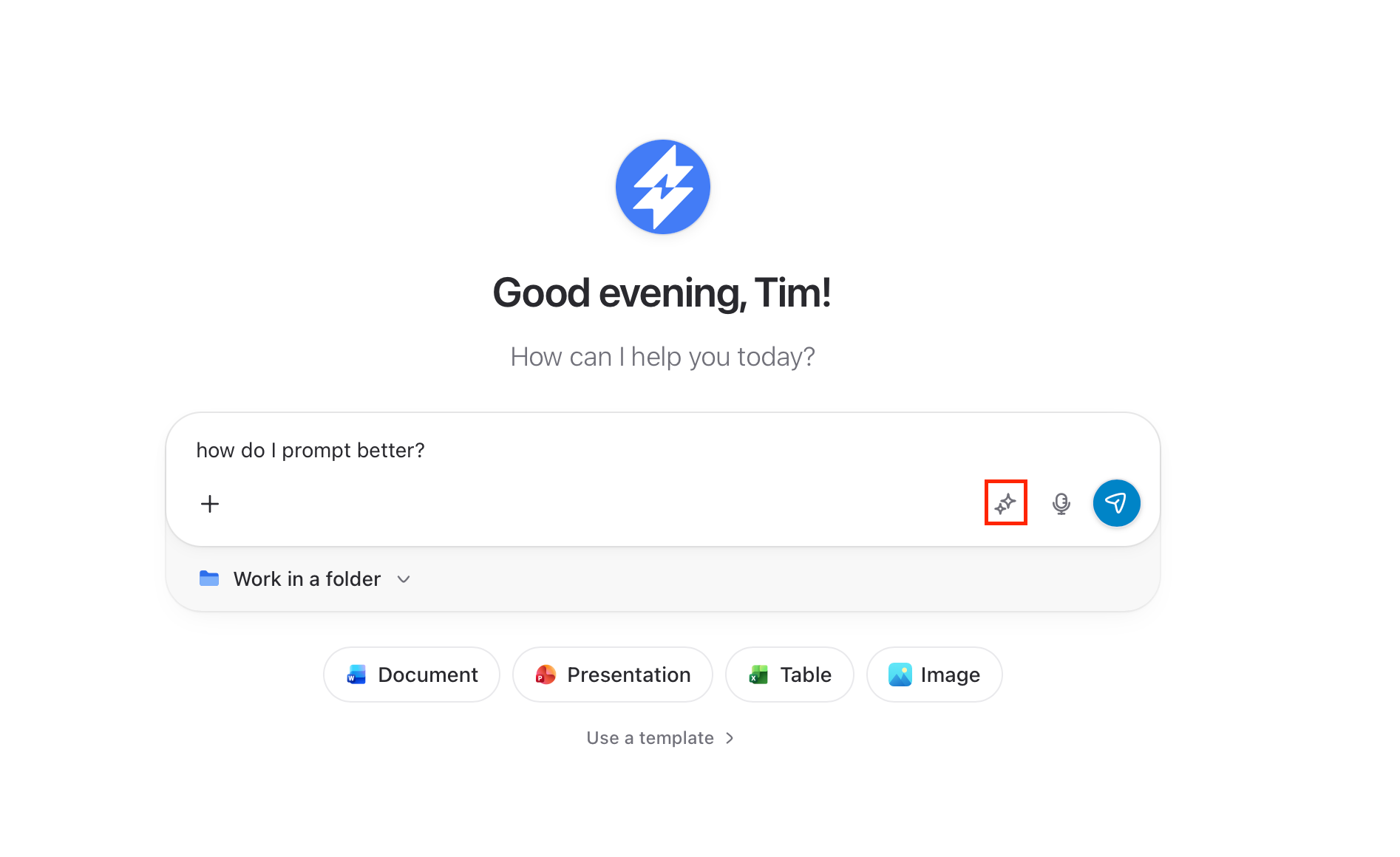
You don’t have to formulate every prompt yourself. In innoGPT, you’ll find the ✨ star icon in the input field. Clicking it automatically transforms your keywords into a structured, professional prompt—with role, context, task, and format.
Here’s how it works:
Type your rough idea into the input field (e.g., “Email to customers regarding delay”).
Click the ✨ star icon to the right of the input field.
innoGPT It generates a structured prompt from it in seconds.
Send the suggestion right away or tweak it first.
The basic principles
1. Clarity over brevity
AI models aren’t mind readers. The more specific your request, the more precise the answer.
❌ Vague:
Write something about Marketing
✅ Precise:
“Create a 200-word introduction about content marketing strategies for B2B companies, with a focus on LinkedIn activities. Target audience: marketing managers with 3–5 years of experience. Tone: professional but accessible”
2. Context is king
The more relevant background information the AI receives, the more appropriate the answer will be. Explain who you are, who you’re writing for, and in what context the output is needed. Also use the voice feature to provide context more easily and quickly, rather than typing too much.
"I'm the sales director of a SaaS company with 50 employees. We sell project management software to mid-sized businesses. Write a follow-up email to a prospect I had a product demo with last week. Goal: schedule a second meeting with the CTO."3. Assign a role”
If you give the AI a specific role, it will respond from that perspective—using appropriate vocabulary and level of detail.
"You are an experienced tax advisor specializing in e-commerce companies. Explain to me in an understandable way what the Kleinunternehmerregelung (small business regulation) is, when it's worthwhile, and which three most common mistakes I should avoid when registering."
4. Define the format
Tell the AI explicitly what the result should look like—table, list, continuous text, JSON, word count, tone.
Create a table with 5 columns: tool name, main function, pricing model, ideal for, rating (1–5). Fill it with 8 AI tools for content creation. Sort by rating in descending order.
5. Provide examples (few-shot)
If you want a specific style or structure, show the AI 1–2 examples. This is often more effective than any description.
Formulate LinkedIn posts in the following style:
Example 1: "Today I learned: 80% of all meetings could be an email. The other 20%? Need a clear agenda item."
Example 2: "The best marketing strategy? Build a product that people talk about voluntarily."
Example 3: “I’ve uploaded a similar social media post for you; use this structure as a guide…”
Now write 3 posts in the same style on the topic of "Remote Work."
Tips for even better prompts
Iterate: The first prompt is rarely the best. Refine it step by step instead of starting over.
Specify what you don’t want: “Avoid marketing clichés” or “No bullet points” guides the model specifically.
Have the AI formulate prompts for you—write me a prompt for a social media assistant that understands and can create our posts; here’s an example post.
Use separators: With
###or---, you can clearly delineate sections.Let the AI think: “Think step by step” or “Justify your answer” significantly improves the quality.
Save what works: Good prompts belong in your prompt library—that way, you’ll never have to rewrite them again.
Was this helpful?
Still need help? Ask the team