EU AI Labeling in the Studio: Labeling Images to Ensure Legal Compliance
Starting August 2, 2026, the EU AI Act (Article 50) requires that certain AI-generated content be clearly identifiable to users. To save you from having to manually relabel every image, we’ve integrated the official EU labeling icons directly into Photo Studio at innoGPT. One click, and your image will bear the official label, including metadata in the background.
💡 In short: Compliance needs to happen right where your team is already working. When the legally compliant route takes more clicks than the quick one, the quick one always wins in day-to-day work. That’s exactly what we’re solving.
What does this feature do?
In Photo Studio, you can automatically apply one of the three official EU symbols to AI-generated or AI-edited images:
The icon is embedded directly into the image and remains visible even after downloading, reposting, or further processing. Additionally, corresponding metadata is written into the image.
Enable labeling as a user
Open Photo Studio via the sidebar (
Studio → Photo Studio)Select the “Add EU Label” icon
Download the labeled image or share it directly

✅ Done. The label is visible on the image, and the metadata is stored. No need to use external tools.
Manage labeling as an admin
As a Workspace admin, you determine how strictly labeling is enforced in your team. You’ll find this setting at Settings → Studio → EU-Kennzeichnung.
You have three modes to choose from:
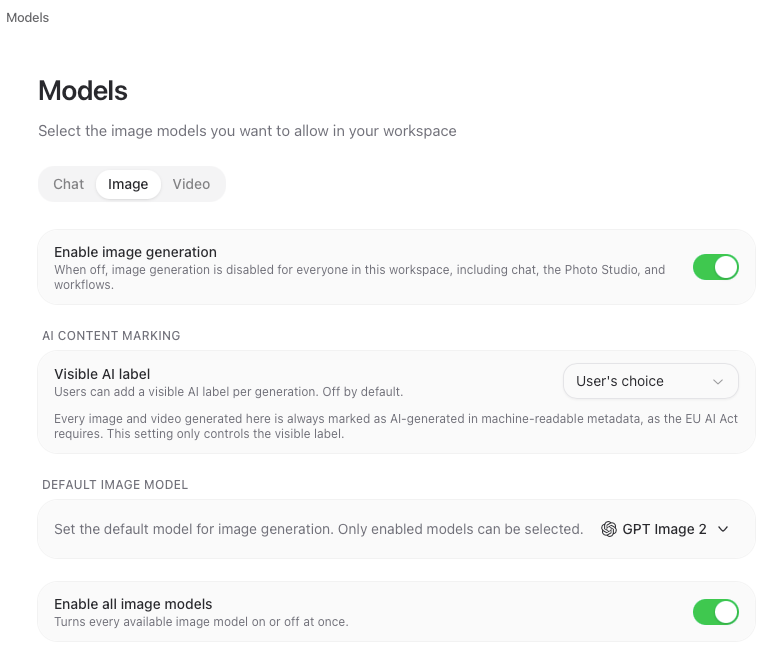
🔓 Off
No automatic labeling, no selection option in Studio. This is useful if you handle labeling outside of innoGPT or aren’t currently producing any deepfake-related content.
👤 Optional (user decides)
Each user decides for themselves, on a per-image basis in Studio, whether to set a label and which one to use. The recommended default for most teams: flexibility for marketing and creative teams, without any pressure.
🔒 Mandatory
Every image created or edited in the Studio is automatically assigned the appropriate label. No image leaves the Studio unlabeled. Recommended for regulated industries (finance, healthcare, public sector) or if you want to play it safe.
⚠️ Important: Even in mandatory mode, the icon does not replace a legal review. It supports the implementation of Article 50 but does not, on its own, constitute proof of compliance.
When do I actually need the label?
The AI Act does not require blanket labeling for every AI-generated image. The context and potential for deception are the deciding factors. Rule of thumb: Anything that could theoretically be real must be labeled.
Labeling required:
An AI-generated photo of a company building that looks real
A manipulated corporate video or a synthetic product image
AI image that suggests an event that did not take place
Advertising illustration that looks deceptively real, like a photo
No labeling required:
Clearly recognizable graphics, icons, caricatures, and comics
Minor edits (sharpening, color correction, exposure)
Removal of minor image elements (e.g., people in the background)
You can find the complete overview with examples in the blog post “AI Labeling Requirements – EU Rules Effective in August: How to Implement Them?.”
Frequently Asked Questions
Will images from the past be retroactively labeled? No. Content created and published before August 2, 2026, is permanently exempt from this requirement. The feature applies only to newly generated or edited images.
Does the label remain visible when someone shares the image? Yes. The icon is embedded directly into the image and remains visible even after downloading, taking a screenshot, or reposting.
What happens to the metadata? In addition to the visible icon, information about the AI origin is stored in the image metadata (similar to C2PA-like standards). This ensures that the information remains technically traceable.
Can I remove the label later? No, not within innoGPT. This ensures that the labeling remains integrity-preserving.
Does the labeling also apply to videos from Video Studio? The current version applies to images first. Video support will follow in one of the next releases.
Was this helpful?
Still need help? Ask the team